Soldering Stations for Electronics Repair and Hobby Work
A soldering station is not simply a hotter version of a plug-in iron. A controlled bench station lets you select a working temperature, rest the iron safely between joints, and replace tips suited to the job. Those details matter when repairing a loose wire, assembling a keyboard, installing a connector, or learning through-hole electronics. The right choice depends on thermal recovery, tip availability, workbench space, and whether you really need specialized rework equipment. In this guide, we compare digital and analog soldering stations for electronics repair, practical starter kits, and more established workshop systems. You will learn why a clean, appropriately shaped tip can matter more than advertised maximum wattage, how to tell different versions of the same station apart, and what to check before buying parts you expect to keep using for years.
How We Chose These Stations
This is a research-based comparison rather than hands-on testing. We checked identifiable model names, exact US Amazon product identifiers, manufacturer or product-manual descriptions, the practical differences among supplied irons and bench accessories, and replacement-tip considerations. Each recommendation reflects a different buyer problem: straightforward workshop use, learning with bundled tools, a more organized repair bench, or a simpler analog control. A manufacturer’s wattage label is not a measured tip-recovery benchmark, and model variants can change package contents. Read the current product offer and the exact manual before buying, especially when your work calls for specific handpieces or connectors. Ratings and prices are deliberately not reproduced because they change.
Quick Picks for Different Projects
- Hakko FX-888DX (120V, Titanium Silver) — A lasting general-purpose bench station with straightforward temperature adjustment.
- Weller WE1010NA (70W) — Regular electronics repair with a reputable 70-watt controlled iron.
- X-Tronic 3020-XTS — Beginners who want an accessible LED station with useful bench accessories.
- WEP 927-IV (110W) — Small workbenches needing a lamp, magnifier, and component holders.
- YIHUA 939D+ III EVO (110W) — Frequent hobby repairs that benefit from four stored temperatures.
Compare Ten Soldering Stations
Start by matching the iron and controls to your actual repairs; extra accessories have value only when you will use them.
| Model & Photo | Best Fit | Key Difference | Amazon |
|---|---|---|---|
| A lasting general-purpose bench station with straightforward temperature adjustment | Rotary temperature control; T18 tip family | Check the latest price on Amazon | |
| Regular electronics repair with a reputable 70-watt controlled iron | 70W WEP 70 iron; ESD-safe digital controls | Check the latest price on Amazon | |
| Beginners who want an accessible LED station with useful bench accessories | 75W station; LED display; timed sleep function | Check the latest price on Amazon | |
| Detailed hobby work where presets and hands-free positioning matter | Dual LED display; three temperature presets; helping hands | Check the latest price on Amazon | |
| First through-hole projects with a ready-to-use collection of small tools | 60W digital kit; six tips; sleep and calibration | Check the latest price on Amazon | |
| Small workbenches needing a lamp, magnifier, and component holders | 110W claimed power; presets; integrated LED magnifier | Check the latest price on Amazon | |
| DIY repairs where visible settings and grounding are priorities | 90W rated iron; dual digital readout; grounding lead | Check the latest price on Amazon | |
| Frequent hobby repairs that benefit from four stored temperatures | 110W rated system; four memory channels; sleep mode | Check the latest price on Amazon | |
| Small component repair with a recent kit-style LED station | 130W MAX marketing rating; sleep mode; five tips | Check the latest price on Amazon | |
| Simple analog-control soldering without menus or digital features | 60W variable-power analog station; iron holder | Check the latest price on Amazon |
Ten Soldering Station Reviews
1. Hakko FX-888DX (120V, Titanium Silver)
Best for: A lasting general-purpose bench station with straightforward temperature adjustment.

The Hakko FX-888DX is a sensible starting point for someone who wants to learn proper soldering technique on a bench they will keep for years. Its updated rotary temperature control makes everyday adjustment more direct than the older FX-888D button interface. The included iron and holder suit through-hole components, wires, connector repairs, and many general PCB jobs. Hakko also documents a range of compatible handpieces, although those accessories are not included in this standard station package. This selection refers to the US 120-volt titanium-silver version, not visually similar 100-volt imported versions.
The central ownership benefit is its established T18 replacement-tip family. A medium chisel tip is often more useful than an extremely fine point because it transfers heat to both pad and lead promptly. However, the FX-888DX is a conventional tip-and-heater station, not a fast cartridge station, and unusually heavy ground planes can challenge it. Confirm the exact input voltage and included tip before checkout; photographs of other colors and earlier Hakko models are not interchangeable. This is for buyers who prioritize a supported tool and predictable controls over a box full of accessories.
Product background: exact-model product documentation.
2. Weller WE1010NA (70W)
Best for: Regular electronics repair with a reputable 70-watt controlled iron.

Weller’s WE1010NA is a digital 120-volt station supplied with the WEP 70 handpiece and an appropriate safety rest. Its temperature setting and easy-to-read display suit someone who repeatedly solders connectors, small circuit boards, or hobby projects and wants to return to a consistent working setting. Weller describes the system as ESD safe, with an ergonomic iron and a heat-resistant silicone cable. The important specification is the 70-watt handpiece rather than the highest temperature printed on a listing: a stable tip and good contact with the joint are what make solder flow efficiently.
The WE1010NA is worth comparing against the Hakko chiefly on grip comfort, control preference, and replacement tip supply where you shop. Weller’s ET-series tip options let a user match small joints and wider copper areas without buying an entirely new station. There is no integrated hot-air gun, magnifier, or helping-hands fixture in the basic package, so allow room in the budget for those if needed. Do not confuse this model with newer Weller WE1010 BLACK variations or other differently bundled kits when checking current offers and images.
Product background: exact-model product documentation.
3. X-Tronic 3020-XTS
Best for: Beginners who want an accessible LED station with useful bench accessories.
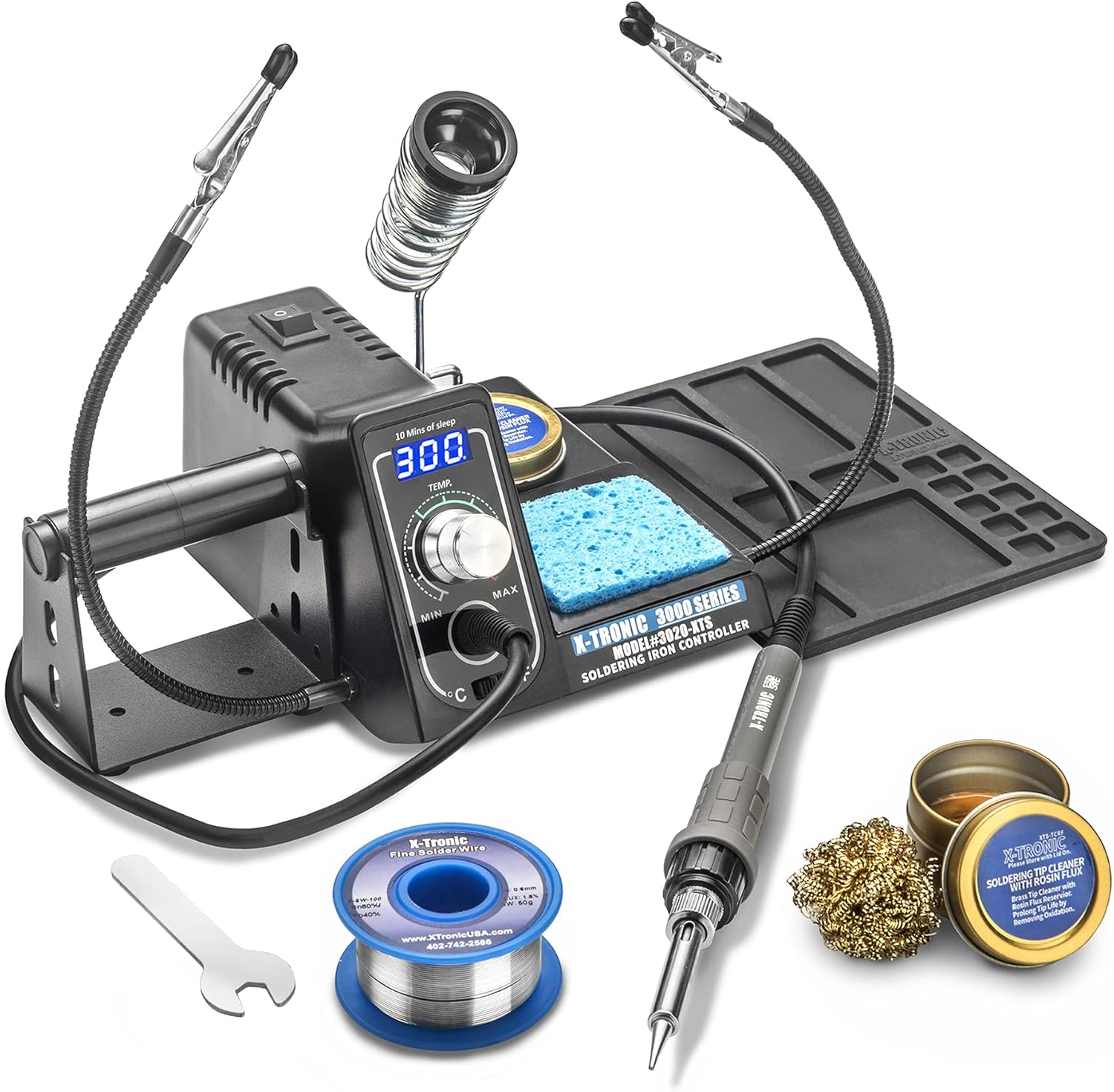
The X-Tronic 3020-XTS combines a digital LED station with the items that make a first workbench easier to organize. Manufacturer listings describe a 75-watt main unit, an ergonomic handpiece, temperature display, a ten-minute sleep function, a solder-roll holder, and wet and brass tip-cleaning options. Some kit bundles add helping hands, a silicone mat, extra tips, solder, tweezers, or a solder sucker. That matters because small accessories quickly add up for someone starting their first keyboard, cable, or hobby-electronics project. Select the exact kit pictured in the offer rather than assuming every 3020-XTS package contains the same extras.
The workstation features do not replace basic technique. Start with a sensible temperature and a chisel tip large enough to make contact with the metal you are joining; extra heat is not always the answer when a pad is slow to wet. The sleep mode is convenient for intermittent work, but the iron still needs a secure holder and safe shutdown. Before purchasing, verify that the listed power unit is suitable for US outlets and that replacement tips match the supplied handpiece. It is a compelling learning package when the accessory selection is genuinely useful.
Product background: exact-model product documentation.
4. X-Tronic 3060-PRO
Best for: Detailed hobby work where presets and hands-free positioning matter.

The 3060-PRO is a different step up within X-Tronic’s conventional soldering stations. The manufacturer’s description identifies two LED temperature readouts, three programmable presets, adjustable sleep timing, calibration, and Celsius/Fahrenheit selection. These are practical conveniences when alternating between small board pads and larger wire connections because you can return to familiar settings without continually adjusting by feel. The kit version associated with this listing adds a mini magnifying lamp and helping hands, allowing parts to stay positioned while you hold the iron in one hand and feed solder with the other.
Those fixtures are especially helpful for intermittent electronic repair, but they do take desk space and should never clamp a delicate component with excessive force. Calibrated display values are still not a substitute for a correct tip shape and proper joint preparation. This is a traditional soldering iron station; it does not include a hot-air blower for surface-mount removal. Buyers comparing a 3060-PRO with the 3020-XTS should decide whether the dual displays, three presets, and workstation fixtures are worth the more involved setup. Confirm the exact accessory bundle before purchase.
Product background: exact-model product documentation.
5. YIHUA 926 III (60W Kit)
Best for: First through-hole projects with a ready-to-use collection of small tools.

The YIHUA 926 III sixty-watt kit combines a temperature-controlled iron with a selection of inexpensive starter tools. The exact listed package includes helping hands, six additional soldering tips, lead-free solder, tweezers, a solder sucker, and a Celsius/Fahrenheit display. It also advertises automatic sleep and calibration support. For someone building a simple electronics kit or learning to replace through-hole components, it can be useful to have basic holding and desoldering tools on the desk on day one rather than discovering they are missing halfway through the project.
An accessory-rich package is not necessarily the best long-term station for every user. The critical questions are whether the iron feels comfortable, whether you can buy the specific compatible tip family later, and whether heat recovers well enough for the boards you work on. Small conical tips may look precise but can struggle to transfer heat to larger joints; try an appropriate chisel geometry. Also verify the exact color and bundle shown at checkout because listings for closely related 926 III configurations may include different accessories. It is a budget-friendly learning option, not a substitute for practice or safe ventilation.
Product background: exact-model product documentation.
6. WEP 927-IV (110W)
Best for: Small workbenches needing a lamp, magnifier, and component holders.

The WEP 927-IV is intended to be more of a compact all-in-one work area than a bare soldering heater. The exact model listing includes a digital station with three preset temperature channels, sleep mode, an LED magnifier, helping hands, a solder dispenser, tip storage, and extra tips. For an occasional repairer dealing with small cables, loose USB connections, or component leads, the integrated fixtures can be as useful as the temperature controls. The 110-watt rating is a stated model specification rather than a guarantee that every joint will heat instantly.
Before choosing this kit, check whether the magnifier sits at a workable angle for your posture and whether your project can be securely supported without tipping the station. A built-in holder does not replace eye protection or fume capture, and magnification cannot compensate for a poor-quality solder joint. The extra fixtures may also make the base busier to clean and store than a simpler station. Compare its actual tip and handpiece support with less accessory-heavy options; long-term replacement availability matters more than the number of parts included in the first package.
Product background: exact-model product documentation.
7. TOAUTO DS90 (90W, Blue)
Best for: DIY repairs where visible settings and grounding are priorities.

The TOAUTO DS90 gives hobbyists a higher nominal power rating and a dual digital temperature display without moving into a large professional station. The published model information describes a 90-watt iron, adjustable working temperatures, automatic standby and sleep behavior, and an anti-static grounding lead. The blue kit is listed with five soldering tips and basic accessories. It should appeal to someone who is progressing from a simple plug-in iron and wants an organized station that can handle common wire joints and electronics projects with repeatable settings.
A 90-watt label is not proof that the tip delivers more useful heat than a different station’s lower-rated handpiece. For a connector attached to a ground plane, the tip’s mass and thermal contact matter at least as much as the maximum control setting. This model also requires proper electrical grounding and a comfortable iron rest; the included grounding lead should be used only as its instructions describe. The display is useful for comparing settings, but verify its calibration procedure if measured tip temperature matters. Confirm the exact blue DS90 package rather than assuming other seller bundles share the same accessories.
Product background: exact-model product documentation.
8. YIHUA 939D+ III EVO (110W)
Best for: Frequent hobby repairs that benefit from four stored temperatures.

The YIHUA 939D+ III EVO is an upgraded digital station built around a 110-watt rating and four selectable memory channels. Its published product record describes digital calibration, sleep mode, an LCD, and a kit that can include a magnifier, helping hands, solder, and several tips. Stored settings can save time when a user alternates among small components, thicker wires, and different solder alloys. The real value is being able to return to appropriate settings for a particular kind of work, rather than treating a higher temperature as universally better.
The handpiece and tips in this EVO variant are not automatically interchangeable with the older YIHUA 939D+ or 926 III families. Confirm the exact 939D+ III name and replacement tip specification before adding accessories. Like other bench stations, it still requires a stable rest, proper ventilation, and periodic tip cleaning. High power can be helpful for thermal recovery but does not justify prolonged heat on delicate plastic parts. Its added memory and controls are most worthwhile for someone who solders regularly enough to develop several repeatable techniques.
Product background: exact-model product documentation.
9. WEP 926LED V3 (130W MAX)
Best for: Small component repair with a recent kit-style LED station.

WEP’s 926LED V3 is a compact digital soldering kit marketed with a 130-watt maximum rating. The exact package description includes a soldering iron, five tips, solder wire, tweezers, a solder sucker, a tip cleaner, temperature adjustment, Celsius/Fahrenheit conversion, and sleep mode. That makes it a realistic alternative to the YIHUA 926 III for someone who wants useful basic tools bundled together with the station. The LED display can simplify returning to familiar settings while learning to solder small boards or repair loose wires.
Treat the advertised maximum wattage as the maker’s product claim, not a measured continuous iron output or proof of faster soldering than an established 70-watt model. The included tips and accessories should match the exact V3 configuration, since similarly named 926-family products are not all the same. If you already own a good solder sucker and helping hands, consider whether a simpler supported station is better value. For reliable joints, a clean plated tip and appropriate contact area matter more than pushing the displayed setting to its highest number.
Product background: exact-model product documentation.
10. Aoyue 469 (60W)
Best for: Simple analog-control soldering without menus or digital features.

The Aoyue 469 is a different type of bench choice: a relatively simple sixty-watt variable-power station with an analog control knob. The supplied holder, sponge, and solder-spool support are useful for organizing a small work surface, and Aoyue describes a removable-tip iron. This is attractive to buyers who make occasional wire repairs or through-hole joints and prefer an uncomplicated dial to menus, programmable presets, and a color screen. It also makes a useful teaching example of the difference between an adjustable-power station and a digital temperature-control system.
Be clear about that difference before buying. A dial on a basic station does not mean the tip is being actively regulated to a specific measured temperature in the way a thermally controlled digital station attempts. You will rely more on technique and test joints to find an appropriate setting. If you often solder heat-sensitive PCB parts or need to repeat a documented process, the Hakko or Weller options above are more appropriate. Verify replacement tip availability, keep the iron safely seated between joints, and use a clean wet sponge or approved tip cleaner. For rare projects, the absence of complex controls can be a virtue.
Product background: exact-model product documentation.
How to Choose a Soldering Station for Electronics
An adjustable soldering iron is useful, but a station becomes much easier to live with when its tip family, heat delivery and controls fit your projects. Use these practical checks rather than shopping solely by the largest wattage printed on the box.
1. Start with the joint size and materials
Fine component leads, keyboard switches and through-hole resistor pads do not require the same heat delivery as thick wire, shielded cable or a connector tied to a large copper ground plane. Small jobs benefit from a light handpiece and an appropriately shaped tip; larger metal areas need a tip with enough contact surface and a station that replenishes heat as energy flows into the work. An iron with a higher nameplate wattage can still feel slow if the tip is very thin or the heater transfers heat inefficiently. Think in terms of the actual joints you make most often.
2. Understand temperature control versus variable power
A digitally regulated station senses or estimates temperature and adjusts power to maintain its setting. An analog variable-power tool such as the Aoyue 469 uses a simpler adjustment and does not provide a precise displayed working-tip temperature. Digital presets and calibration are useful when moving between different solder types or boards, but they are not a substitute for good solder, flux and technique. The displayed value may not match actual joint temperature under a heavy thermal load. Start at a reasonable setting for the solder and follow the station manual; do not automatically use the maximum.
3. Check tip geometry and replacement availability
The soldering tip is a consumable working part. A medium chisel often heats a pad and a lead faster than a needle-point tip because a larger clean surface touches the work. Small bevels and fine tips serve more confined spaces, while broader shapes can help on connectors and ground planes. Check the exact tip series sold for the specific handpiece: a Hakko T18 tip is not the same thing as a YIHUA kit accessory, and even stations from one brand may use different families. Look up replacement handpieces, heating elements and rests before choosing the cheapest listing.
4. Know when hot-air rework or desoldering is necessary
A conventional soldering iron handles many cables, through-hole joints and small surface-mount repairs. Removing certain multi-pin surface-mount packages or shielded components may require a separate hot-air rework station, protection for nearby plastics, and controlled airflow. A solder sucker or desoldering braid can help remove through-hole solder, but neither guarantees easy removal from a multilayer board. Do not buy a hot-air combination unit merely because it lists more tools if your work is mostly adding or repairing wires. Repairing fine-pitch electronics also calls for magnification and careful ESD handling.
5. Pay attention to the holder, sleep mode and bench space
A secure, heat-resistant rest is nonnegotiable. Sleep mode can reduce extended high-temperature idling on stations that support it, and a predictable power-off procedure prevents an unattended hot iron. A compact station is useful on a shared desk, but helping hands, lighting, a magnifier and solder-roll storage can turn it into a busy workstation. Decide what you already own before paying extra for a bundle. Test the reach of the power cord and handpiece cable, and ensure the holder is stable without forcing your wrist into an awkward position.
6. Compare electrical compatibility and safety features
For US use, check the actual 120V input designation instead of assuming an imported-looking model will be compatible. ESD-safe construction is relevant when working with sensitive electronics, but the whole work area needs appropriate static control; a grounding label alone is not a complete ESD program. Solder and flux can create health hazards, so use suitable local fume extraction and handwashing practices. Follow the supplier safety instructions and never work on energized circuits. The UK Health and Safety Executive explains the risks of rosin-based flux fume and the value of suitable ventilation controls.
7. Think about ownership, not only purchase price
For frequent use, a durable station with replaceable tips and irons can be less frustrating than a large accessory kit whose replacements are difficult to find. Inspect manuals, parts support, the supplied tip, and storage needs. If you solder only a few small kits a year, a modest digitally controlled bundle may be sufficient. If you regularly repair boards, a supported iron with sensible temperature controls and more comfortable handpiece is worth prioritizing over novelty features. Keep money in the budget for flux, high-quality solder, extraction and a non-damaging tip cleaner.
Buying Tip: Before buying, identify the exact replacement-tip family and price out one medium chisel tip. A station that looks inexpensive can become a poor value if the only available accessories are incompatible, unreliable, or hard to replace.
Setup, Safe Use and Troubleshooting
Set up a reliable work area
Put the station on a stable heat-resistant surface and route the handpiece cable away from the work. Position approved fume extraction so flux vapors do not pass through your breathing zone. Arrange a secure holder, suitable tip cleaner, eye protection and a way to steady the part. Confirm mains voltage and the tip type against the station manual. Turn the unit on only when ready to work, and allow the iron to cool fully before storage.
Solder refuses to wet a joint
Clean oxidation from the pad and wire, apply suitable electronics flux, and make sure the working tip is clean and lightly tinned. Bring the tip into contact with both surfaces, then feed solder to the heated joint. Increasing temperature indefinitely is not a substitute for preparing the metal or choosing a tip with adequate contact area.
The tip turns dark or transfers heat poorly
Oxidation and dirty plating can impair solder flow. Clean the tip as directed using a damp sponge or suitable non-abrasive brass cleaner, then apply fresh solder to protect the working surface. Avoid filing or grinding plated tips. Hakko’s tip-maintenance guidance explains how keeping the wettable area properly tinned helps maintain performance.
Plastic connectors soften before the solder flows
Stop heating and let the assembly cool. Check the connector’s temperature tolerance and whether a better-sized tip can transfer energy more quickly to the metal instead of heating the surrounding plastic for a prolonged time. Secure the wire to prevent joint movement while cooling. Practice on inexpensive spare parts before making a delicate repair.
The station seems too cool on a ground plane
A large copper area is a heat sink. Use a suitable larger tip, make good contact, and ensure that the iron is fully warmed. If a joint consistently overwhelms a small station, choose a higher-capacity supported system rather than using extreme temperatures or excessive dwell time that could lift PCB pads.
Temperature drifts or the tip feels loose
Confirm the correct handpiece and compatible tip, let the unit reach its setting, and inspect seating and connectors with power off after cooling. If the manufacturer provides calibration, follow the documented procedure with appropriate instruments. Do not adjust hidden calibration values just because a joint is slow to heat; the cause may be thermal load, oxidation or a poor tip fit.
Flux fumes or residues are becoming a problem
Reposition effective local fume extraction close enough to capture emissions without blowing molten solder across the board. Review the solder and flux safety instructions, wash hands after handling lead-containing materials, and keep food and drinks out of the work area. Soldering is not an activity to perform on a couch or cluttered table.
Sources and Further Reading
The product comparisons use manufacturer specifications, model documentation and matching retail product details; we have not performed laboratory heat-recovery tests. For technique and safety, see Hakko’s guide to keeping a tip in good condition, Weller’s WE1010NA documentation, and the Health and Safety Executive’s guidance on solder-flux fumes. Features and included accessories can differ by exact kit and may be revised by manufacturers.
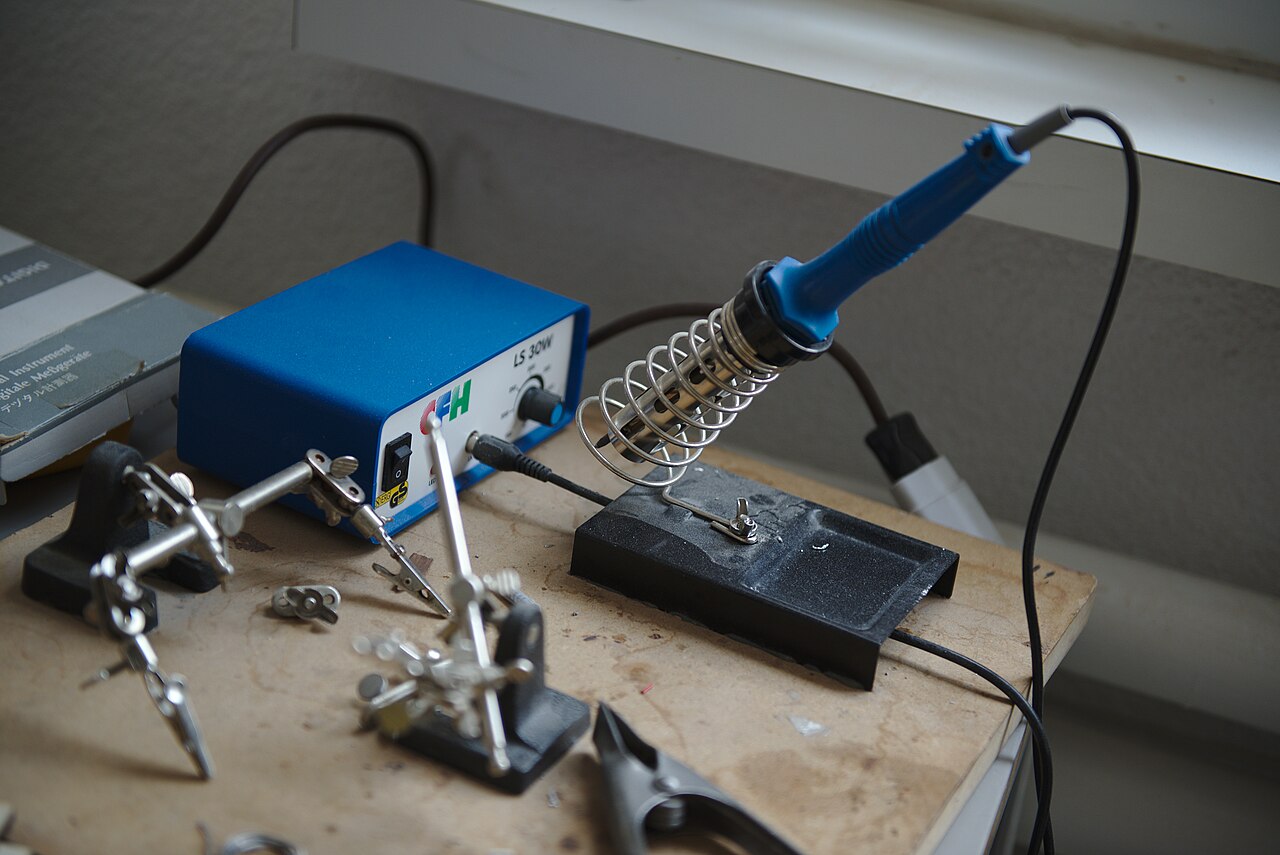
Featured image: tonnerrelombard / FabLab Zürich, Wikimedia Commons, licensed under CC BY 2.0. Automatically resized for display. The pictured station is illustrative and is not one of the ten reviewed models.
As an Amazon Associate, Size Them Up earns from qualifying purchases.
Frequently Asked Questions
Is a digital soldering station always better than an analog one?
Not automatically. A regulated digital station is convenient when you want a repeatable temperature setting and often includes sleep or preset functions. A simple analog variable-power station can still be useful for occasional basic soldering. Tip condition, heat transfer and available replacement parts remain important in either case.
How many watts do I need for electronics repair?
There is no universal number. Hobby stations in this guide span a range of advertised ratings, but the tip’s thermal contact and heater recovery are just as important. A small through-hole pad behaves differently from a thick cable lug or copper ground plane. Pick the system for your most common joints, not its maximum wattage.
Can a soldering iron replace a hot-air rework station?
For many wires, connectors and through-hole components, yes. Certain surface-mount packages and shields are easier to remove with appropriately controlled hot air, while a dedicated desoldering tool or wick may be more practical for some through-hole work. Protect nearby components and follow safe techniques.
What soldering tip should a beginner start with?
For common electronics work, a medium chisel tip is often versatile because its flat working surface transfers heat to a pad and lead together. Add a narrower or broader shape only when your projects demand it. Confirm exact compatibility with your handpiece rather than assuming all replacement tips fit.
Should I buy leaded or lead-free solder?
Use the solder that is appropriate for your project, applicable safety rules and component requirements. Different alloys can have different melting and wetting characteristics. Regardless of alloy, flux fumes require suitable controls; follow the solder and flux safety data, keep your work area clean and wash hands after work.
How should I clean and store a soldering tip?
Use the approved sponge or non-abrasive cleaner, avoid grinding the plated surface, and leave a protective layer of solder on the working area before switching off. Allow the handpiece to cool in a proper holder. A clean, tinned tip commonly performs better than simply setting the station hotter.
Final Verdict
For someone who expects to solder regularly, the Hakko FX-888DX is an excellent place to start the comparison. Its simple rotary control and supported tip system suit a practical workbench. The Weller WE1010NA is another strong candidate if its 70-watt iron and Weller handpiece feel better suited to your work. Both focus on the station rather than an accessory-heavy starter package.
For first-time electronics projects, compare the YIHUA 926 III and X-Tronic 3020-XTS if you would benefit from tips and supporting tools. The WEP 927-IV is a practical alternative when magnification and part holders matter. If you mainly want a no-menu analog tool for occasional simple jobs, the Aoyue 469 offers a distinct approach. Whichever you choose, buy the exact configuration that fits your outlet, verify compatible replacement tips, and allow room for safe ventilation and sound soldering technique.